How I discovered a critical authorization bypass in SuperX, an X.com productivity tool, that allowed free users to post to X without ever paying, costing them potentially thousands in API fees.
Introduction: The Cost of Client-Side Trust
In modern web development, one fundamental security principle gets violated more often than any other: never trust the client. This case study examines a real-world vulnerability I discovered in SuperX, a popular X.com (Twitter) productivity tool, where relying solely on client-side validation led to a critical security flaw that could cost thousands in unauthorized API usage.
SuperX is a well-designed productivity tool that helps users manage and schedule X posts. Like many SaaS products, they use a tiered pricing model where premium features like AI tools and post scheduling are locked behind a paywall. The client-side enforcement worked perfectly, until it didn't.
Understanding the Two Layers of Validation
Before we dive into the vulnerability, let's understand the critical difference between client-side and server-side validation:
Client-Side Validation
✓ Fast user experience
✓ Immediate feedback
✓ Reduces server load
✗ Can be bypassed
✗ Never secure
Server-Side Validation
✓ Cannot be bypassed
✓ Secure & authoritative
✓ Controls sensitive operations
✓ Protects business logic
Key Principle: Client-side validation is for user experience. Server-side validation is for security. You need both, but only one can be trusted.
The SuperX Paywall: How It Should Work
SuperX implemented a comprehensive paywall system across their application. When you visit any page or feature as a free user, you're immediately greeted with a professional paywall modal:
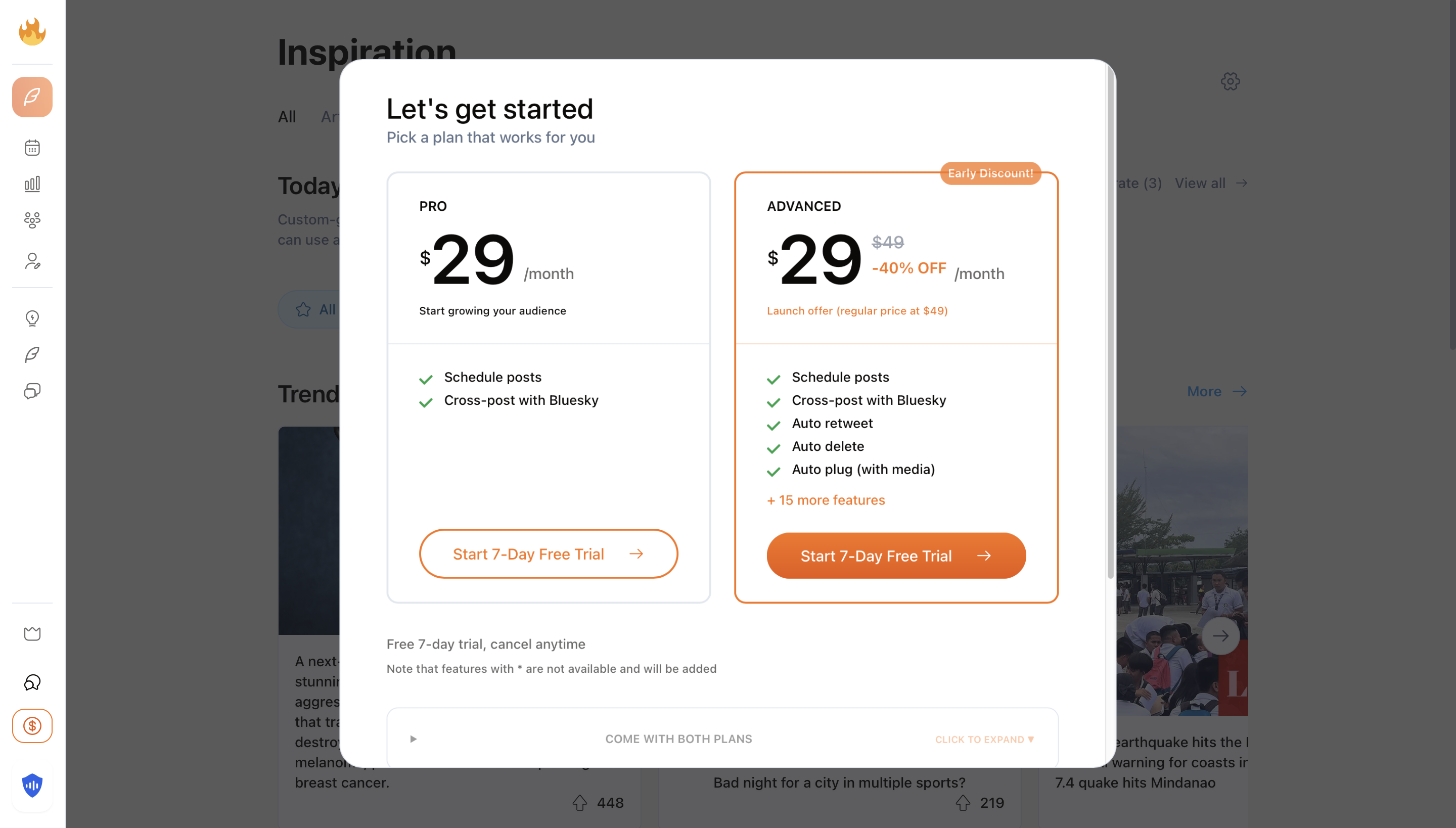
SuperX's paywall modal, a professional, client-side enforcement mechanism
This paywall was well-implemented from a UX perspective. It blocked access to:
- AI-powered tools (auto retweet, auto delete, auto plug)
- Post scheduling features
- Advanced analytics
- Cross-posting capabilities
Every path, every tool, every premium feature had this paywall in front of it. Impressive coverage for client-side protection.
But here's where things got interesting...
The Discovery: Finding the Gap
While testing the application's security, I noticed something peculiar. What happens when you navigate to a page that doesn't exist? Let's find out:
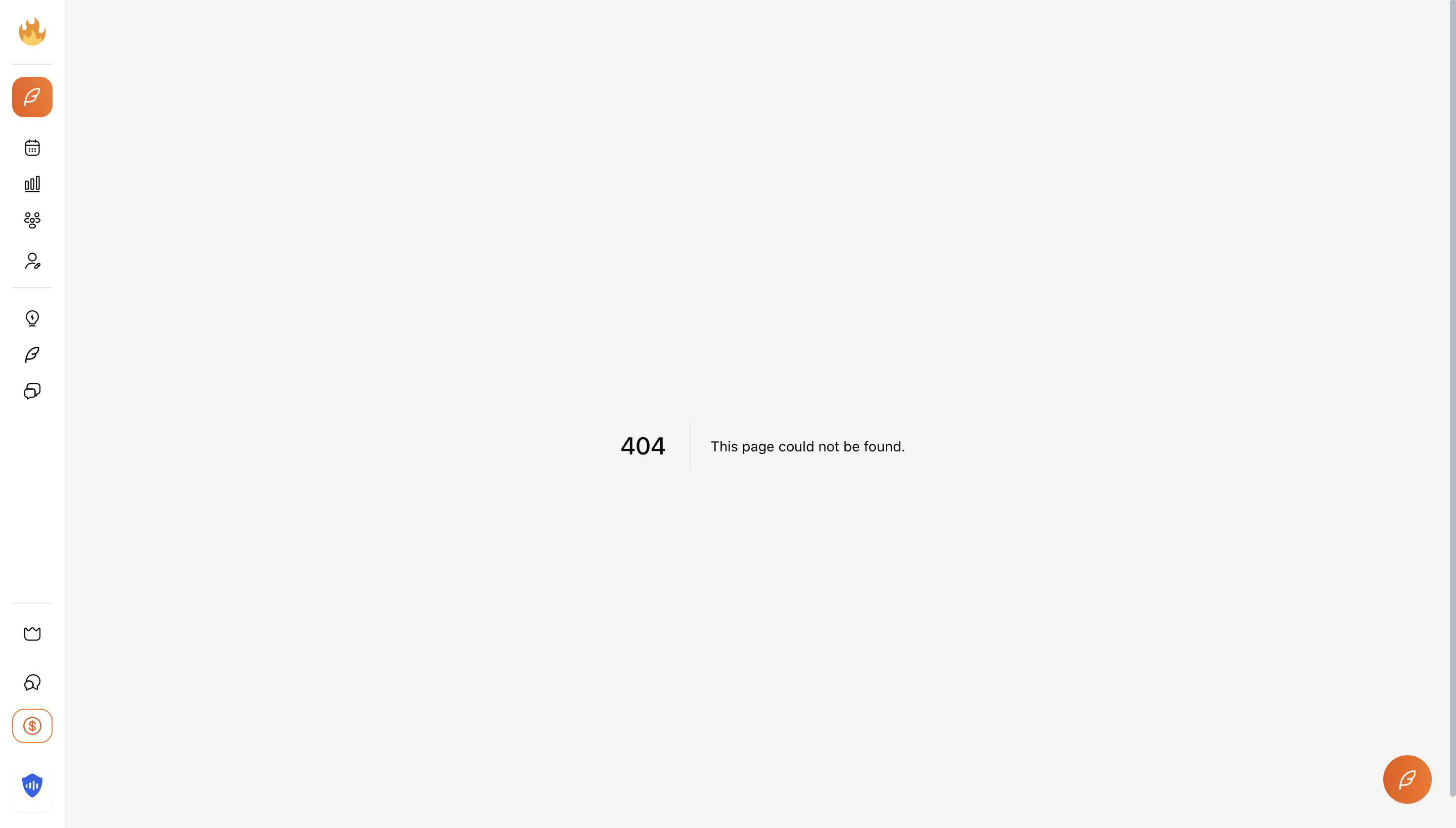
The 404 page, notice anything missing? No paywall!
The 404 error page had no paywall. This might seem like a minor oversight, after all, it's just an error page. But this revealed something important about the application's architecture: the paywall was implemented at the route/component level, not at the API level.
More critically, I noticed that all the interactive elements on this 404 page were fully functional. The "Post on X" toggle was enabled, buttons were clickable, and form fields were accepting input.
This raised the critical question:
If the client-side controls are bypassed (via the 404 page), will the server still enforce authorization?
The Vulnerability: Posting Without Paying
To test this hypothesis, I created a test post from the 404 page with the "Post on X" toggle enabled. Keep in mind, I was using a completely free account, no trial, no payment method on file.
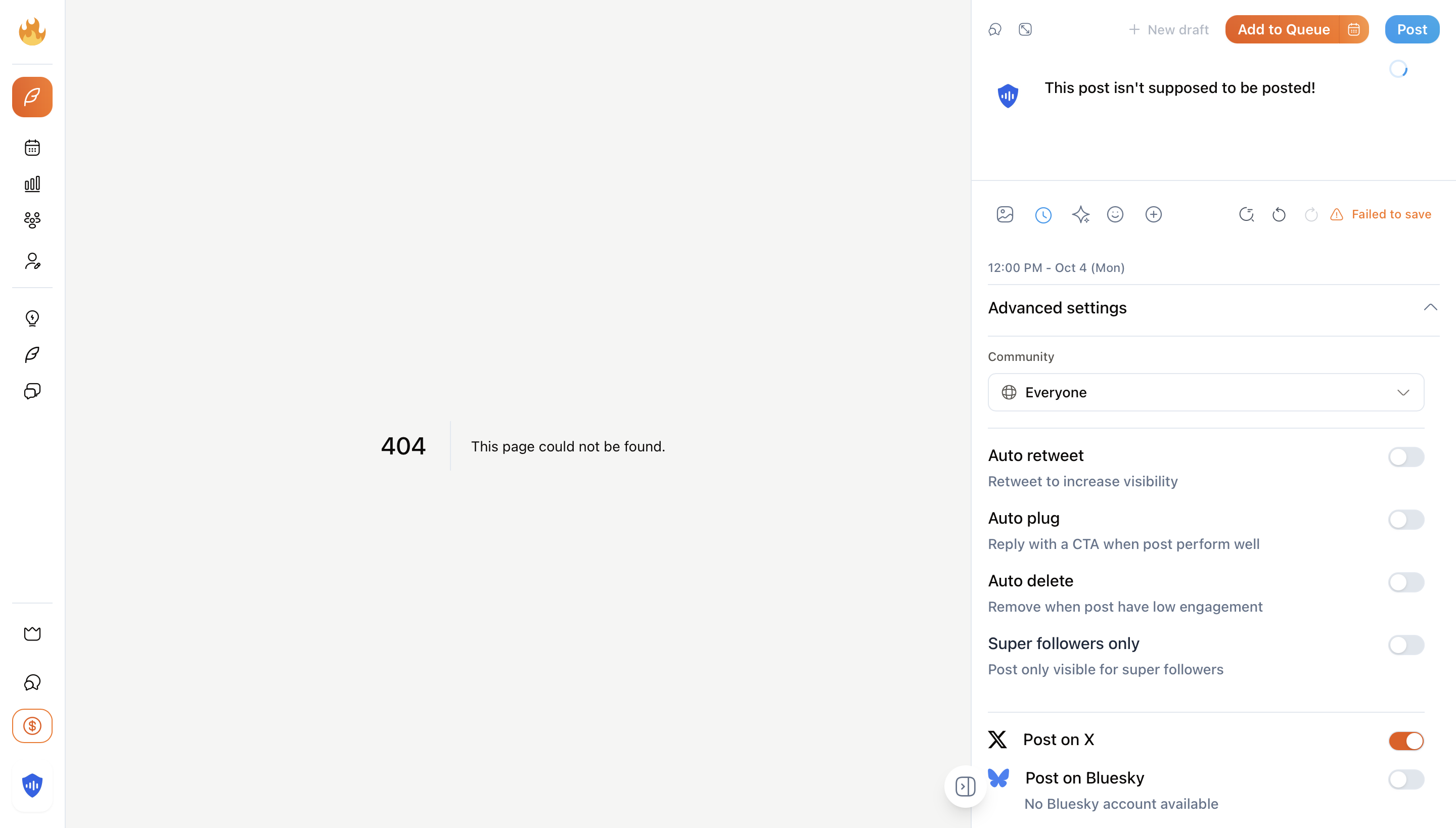
Creating a post from the 404 page, with "Post on X" enabled as a free user( not actual image - recreated for illustration)
🚨 The Result
The post was successfully published to X.com.
On October 4th, 2025, at 5:47 PM, my test post appeared on our X account @securevibing, posted through SuperX's infrastructure using their X API integration, without ever having a paid account.
This meant that while most of SuperX's premium tools had proper server-side validation, the X post scheduling feature did not. The server was blindly trusting the client to enforce authorization.
Why This Is Critically Dangerous
This vulnerability might seem like a simple oversight, but the business impact could be devastating:
💸 Direct Financial Loss
X API calls cost money. If 1,000 free users discovered this vulnerability and each posted 100 times:
- 100,000 unauthorized API calls
- At $0.05-$0.10 per post = $5,000-$10,000 in API costs
- Zero revenue from these users
- Potential API rate limit exhaustion affecting paying customers
📉 Business Model Destruction
If word spread that free users could access premium features, why would anyone pay? This could completely undermine SuperX's revenue model and destroy the incentive for legitimate subscriptions.
⚠️ Service Degradation
Unlimited free access to API-heavy features could overwhelm infrastructure, slow down the service for paying customers, and trigger API rate limits that affect everyone.
🎯 Abuse Potential
Malicious actors could create unlimited free accounts and use SuperX as a free spam platform, potentially getting SuperX's X API access revoked entirely.
Responsible Disclosure: How We Fixed It
Upon discovering this vulnerability, I immediately reached out to SuperX co-founder Rob Hallam through X DM with a detailed disclosure including:
- Evidence of the successful unauthorized post
- Potential business impact assessment
- Recommended remediation steps
Response Time: Rob and the SuperX team responded within hours and had the vulnerability patched within 24 hours. This is exactly how responsible security disclosure should work.
After the patch was deployed, I tested the same exploit again. This time, attempting to post from the 404 page resulted in a proper server-side authorization check:
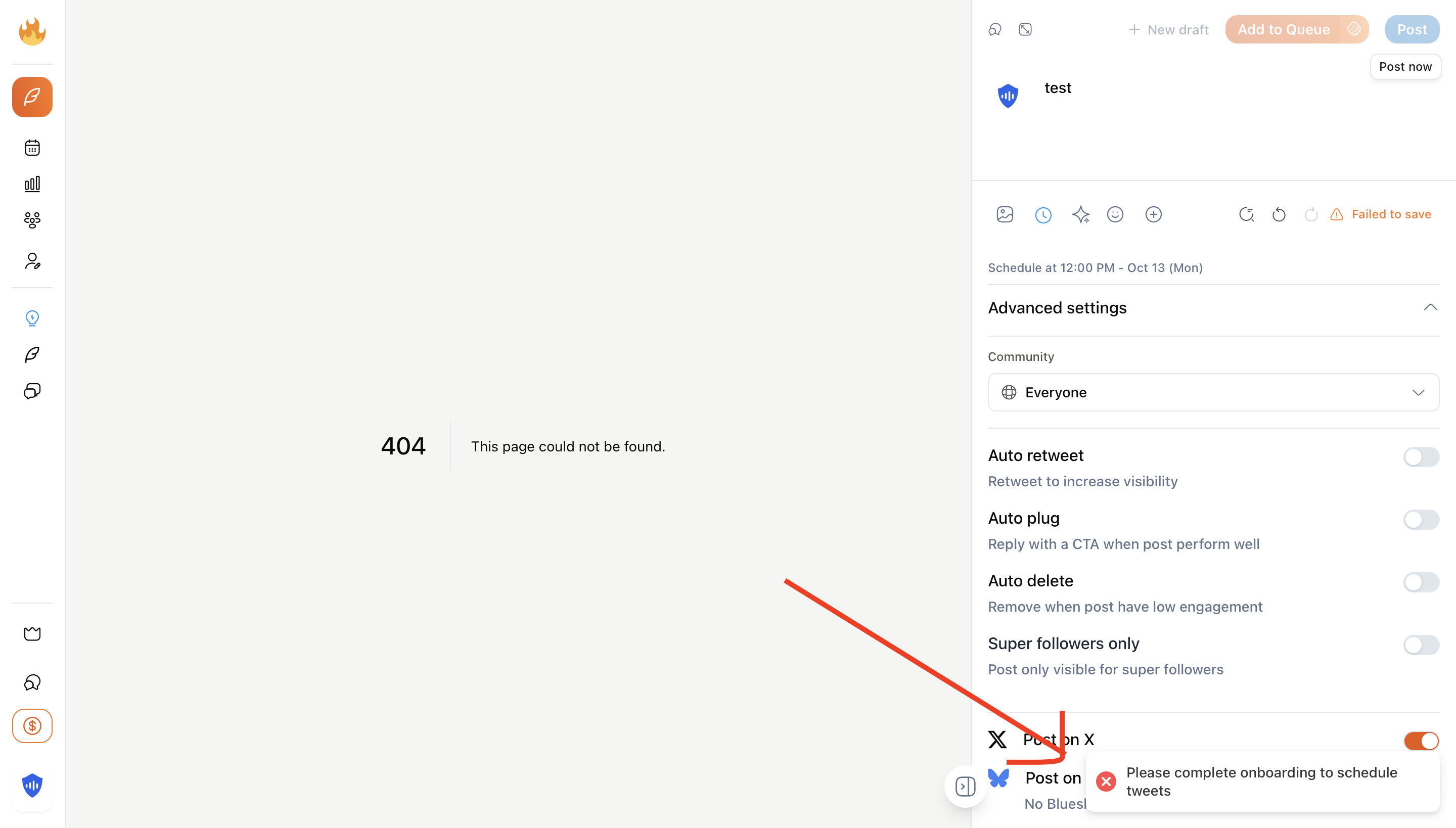
After the patch: proper server-side validation prevents unauthorized posts
The vulnerability was completely closed. Now, even if someone bypasses the client-side paywall, the server properly validates the user's subscription status before executing any premium features.
The Technical Fix: Defense in Depth
While I don't have access to SuperX's internal codebase, based on the behavior change, here's what the fix likely involved:
Before: Client-Only Authorization
// Frontend component (React/Next.js)
function PostScheduler() {
  const { user } = useAuth();

  // ❌ Only client-side check
  if (!user.isPremium) {
    return <PaywallModal />
  }

  return <SchedulePostForm />
}

// Backend API endpoint
async function POST /api/schedule-post(req, res) {
  const { content, scheduleTime } = req.body;

  // ❌ No authorization check here!
  const result = await postToX(content, scheduleTime);

  return res.json({ success: true, result });
}
After: Defense in Depth
// Frontend component (React/Next.js)
function PostScheduler() {
  const { user } = useAuth();

  // ✅ Client-side check for UX
  if (!user.isPremium) {
    return <PaywallModal />
  }

  return <SchedulePostForm />
}

// Backend API endpoint
async function POST /api/schedule-post(req, res) {
  const { content, scheduleTime } = req.body;
  const userId = req.user.id;

  // ✅ Server-side authorization check
  const subscription = await getSubscription(userId);

  if (!subscription || subscription.tier === 'free') {
    return res.status(403).json({
      error: 'Premium subscription required',
      message: 'Please upgrade to access post scheduling'
    });
  }

  // ✅ Additional rate limiting for abuse prevention
  const canPost = await checkRateLimit(userId, 'post_scheduling');
  if (!canPost) {
    return res.status(429).json({
      error: 'Rate limit exceeded'
    });
  }

  // ✅ Now safe to proceed
  const result = await postToX(content, scheduleTime);

  return res.json({ success: true, result });
}
Key Takeaway: The client-side paywall is still there for user experience, but now there's a server-side guardian that can't be bypassed. This is defense in depth, multiple layers of security working together.
Lessons for Developers: Avoiding This Mistake
❌ Never Trust the Client
Any logic that runs in the browser can be modified, bypassed, or completely removed by a determined user. Client-side checks are for UX convenience only, never for security.
✅ Always Validate on the Server
Every API endpoint that performs a privileged action must independently verify:
- User authentication (who are you?)
- User authorization (what are you allowed to do?)
- Input validation (is your request valid?)
- Rate limiting (are you doing this too much?)
🔍 Test Your Authorization
Don't assume your client-side protection is enough. Test your API endpoints directly:
- Can a free user call premium API endpoints?
- Can users access other users' data?
- What happens if you bypass the frontend entirely?
- Use tools like Postman, cURL, or your browser's dev tools to test
💰 Protect Your Cost Centers
Any feature that costs you money (AI API calls, email sends, SMS messages, third-party services) should have the strongest possible authorization checks. If you're paying per-use, ensure only authorized users can trigger those costs.
📝 Document Your Authorization Logic
Make it clear which endpoints require which permission levels. Use middleware, decorators, or policy classes to centralize and standardize authorization checks across your codebase.
Example Authorization Patterns
Here are some practical patterns for implementing server-side authorization correctly:
Pattern 1: Middleware Authorization (Express.js)
// Reusable authorization middleware
function requirePremium(req, res, next) {
  const user = req.user;

  if (!user) {
    return res.status(401).json({ error: 'Not authenticated' });
  }

  if (user.subscriptionTier === 'free') {
    return res.status(403).json({
      error: 'Premium subscription required',
      upgradeUrl: '/pricing'
    });
  }

  next();
}

// Apply to protected routes
app.post('/api/schedule-post', requirePremium, async (req, res) => {
  // Authorization already checked by middleware
  // Safe to proceed with premium feature
});
Pattern 2: RBAC with Next.js API Routes
// lib/auth.ts
export async function requireAuth(
  req: NextApiRequest,
  minimumTier: 'free' | 'pro' | 'enterprise'
) {
  const session = await getServerSession(req);

  if (!session) {
    throw new Error('Not authenticated');
  }

  const user = await getUserWithSubscription(session.user.id);

  const tierHierarchy = { free: 0, pro: 1, enterprise: 2 };

  if (tierHierarchy[user.tier] < tierHierarchy[minimumTier]) {
    throw new Error(`${minimumTier} tier required`);
  }

  return user;
}

// api/schedule-post.ts
export default async function handler(req, res) {
  try {
    const user = await requireAuth(req, 'pro');

    // User is authenticated and has 'pro' tier or higher
    const result = await schedulePost(req.body);

    return res.json({ success: true, result });
  } catch (error) {
    return res.status(403).json({ error: error.message });
  }
}
Pattern 3: Database-Level Authorization (Supabase RLS)
-- Supabase Row Level Security Policy
-- Only premium users can insert scheduled posts

CREATE POLICY "Premium users can schedule posts"
ON scheduled_posts
FOR INSERT
TO authenticated
USING (
  EXISTS (
    SELECT 1 FROM profiles
    WHERE profiles.id = auth.uid()
    AND profiles.subscription_tier IN ('pro', 'enterprise')
  )
);

-- Even if your API code has a bug, the database won't allow it!
How to Test Your Authorization
Here's a simple checklist for testing authorization in your app:
Authorization Security Checklist
Open your browser's developer tools
Navigate to Network tab before testing
Log in with a free/basic account
Use the lowest permission level available
Try to access premium features
Look for API calls in the Network tab
Copy the request as cURL
Right-click on the API call → Copy → Copy as cURL
Execute the request directly
Paste the cURL command in your terminal and run it
Check the response
Did it succeed? If yes, you have an authorization bug!
Test modification attacks
Try changing user IDs, subscription tiers, or other parameters in the request
Automate these tests or get a professional security audit
Use tools like SecureVibing, OWASP ZAP, or write custom scripts to continuously test authorization. For comprehensive security analysis, get a professional security audit from us.
Why This Matters for Every SaaS
The SuperX vulnerability is not an isolated incident. This same pattern appears across thousands of SaaS applications:
- AI-powered apps where free users bypass paywalls to access expensive LLM API calls
- Email marketing tools where users send unlimited emails without upgrading
- Analytics platforms where free users access enterprise-level data exports
- Automation tools where users trigger premium workflows without payment
- Content platforms where users download unlimited premium assets
In every case, the root cause is the same: trusting client-side enforcement for server-side business logic.
Conclusion: Security Is a Business Priority
The SuperX case study demonstrates a fundamental truth about web security: client-side protection is not security. It's user experience. Real security happens on the server, in the database, and in the architecture of your authorization logic.
✅ Key Takeaways
- Always implement server-side authorization for every protected API endpoint
- Never trust the client, anything in the browser can be bypassed
- Test your authorization with tools, cURL, and different permission levels
- Pay special attention to features that cost you money (API calls, sending messages, etc.)
- Use security tools like SecureVibing to automatically test for these vulnerabilities
- Respond quickly when security issues are discovered, SuperX's 24-hour fix is exemplary
Kudos to Rob Hallam and the SuperX team for their swift and professional response to this disclosure. Their reaction demonstrates a security-first mindset that every SaaS company should emulate.
If you're building a SaaS application, don't wait for someone to find your authorization bugs. Test your app with SecureVibing to automatically detect authorization vulnerabilities, broken access controls, and other critical security issues before they cost you money and customers.
Protect Your SaaS from Authorization Bugs
Don't let a simple authorization mistake cost you thousands in unauthorized API usage or destroy your business model. SecureVibing automatically tests your endpoints for authorization vulnerabilities, broken access controls, and payment bypass issues.
Scan Your App NowDisclosure: This security research was conducted ethically and responsibly. The vulnerability was immediately reported to SuperX co-founder Rob Hallam and was patched within 24 hours before publication of this article. SuperX has given permission for this case study to be published as educational content.